

MAP, by Motorsport IT Systems

The Motorsport Assembly Platform

MAP is the operations platform for a motorsport team's factory, race team and office. Twelve apps, one set of records: how each assembly was built, what's on each car, how far every part has run, and the planning, purchasing, finance and people around it.

Overview

Twelve apps, licensed separately, working as one

Each app is switched on for your installation by your licence key, and every licensed user gets every app on the licence. Admin and user management comes with every licence. Choose an app to jump to it.

  • Factory

    Build sheets, sign-off queues, packing, shipments and turnarounds.

  • Mileage Tracking

    Serialised parts, car trees, mileage limits and service intervals.

  • Trackside

    Jobs at the track, assemblies to fit, Run Plans and returns.

  • Allocations

    Plan which build goes on which car, for every event.

  • Job List

    Raise, assign and track jobs, with Part Care Notes.

  • Inventory

    Stock by location, a full movement ledger and stock counts.

  • Purchase Orders

    Raise, approve and receive orders against your suppliers.

  • Work Orders

    Routed manufacturing and service orders, materials and time.

  • Resource Planning

    Company Calendar, leave, capacity forecast and workload.

  • Reporting

    Reports, dashboards and a SQL workbench over MAP's data.

  • Finance

    Ledger, payables, receivables, VAT, budgets and the cost cap.

  • HR

    Employment, leave balances, recruitment, training and payroll inputs.

How it fits together

One assembly, from the drawing office to the pit wall and back

The same records follow a part through every app it touches, so nobody has to type a serial number twice or reconcile two lists.

  1. EngineerBOM revisions decide which parts are serial tracked, with their life limits and service intervals.
  2. Buy or makeReceiving a serialised part on a purchase order creates its record before anyone builds with it.
  3. Build and sign offA build sheet with its own routed work order, signed off in turn; the last stage writes the build into Mileage Tracking.
  4. ShipPacked for an event, loaded onto a shipment and handed to the race team.
  5. RaceAllocated to a car, fitted, and the distance it runs recorded against every part.
  6. Return and rebuildFlagged for return, then turned around as a new issue, keeping the old one.

Factory

Build sheets with sign-off built in

Every assembly gets a build sheet, stamped from your templates, that records the parts fitted by serial number, the questions answered and the checklists run. When the builder submits it, it moves through the sign-off stages its template needs, and every sign-off records who signed and when.

  1. Submitted
  2. Cross Check
  3. Team Leader
  4. Serialisation

Service Teams sign their own stage alongside, before the last one.

  • New builds and turnarounds: a rebuild starts a new issue and keeps every earlier build exactly as it was
  • Segregation of duties: the builder can't cross-check their own work unless a permission allows it
  • Factory Workload, Lead Lobby and Work Assigned to Me to plan and hand out the work
  • Packing and Shipments: load a van or trailer by scanning, dispatch it and print a shipping manifest
  • A Returns List, shared with Trackside, for everything coming back from an event
A MAP build sheet for a front upright: build questions answered, a hub bearing serial typed and the caliper bolt torque entered, then submitted, so the heading changes from WIP to Built; a second person approves the Cross Check and packs it, and the heading shows Packed
Every answer, serial and torque recorded, then cross-checked by a second pair of eyes before it's packed.

Mileage Tracking

How far every part has run, and how much life it has left

The Part Catalogue holds what a part is: its part number, race and test mileage limits and service intervals. Each physical part is its own serialised record, fitted in a tree on its chassis. Add mileage to a car and it flows down to every part fitted underneath, however deeply nested.

  • Race and test limits, and remaining mileage for each service type
  • Servicing resets the service counters; a part's life is never reset
  • Drag and drop to move parts and assemblies, with an Unassigned list for parts not yet fitted
  • Gear ratios for each circuit, so each transmission part takes its gear's share of the distance
  • Colour warnings as limits approach: MAP flags the risk and leaves the call to your engineers
MAP's Car Build Status + Mileage Entry page for Chassis 1: Add Mileage for whole car puts FP2's 126 km on the car, every part's remaining race and service mileage counts down, and a rear damper's service figure turns red with a warning mark
Add a session's mileage once and every part on the car counts down.

Trackside

The race team's view of the event, on a phone

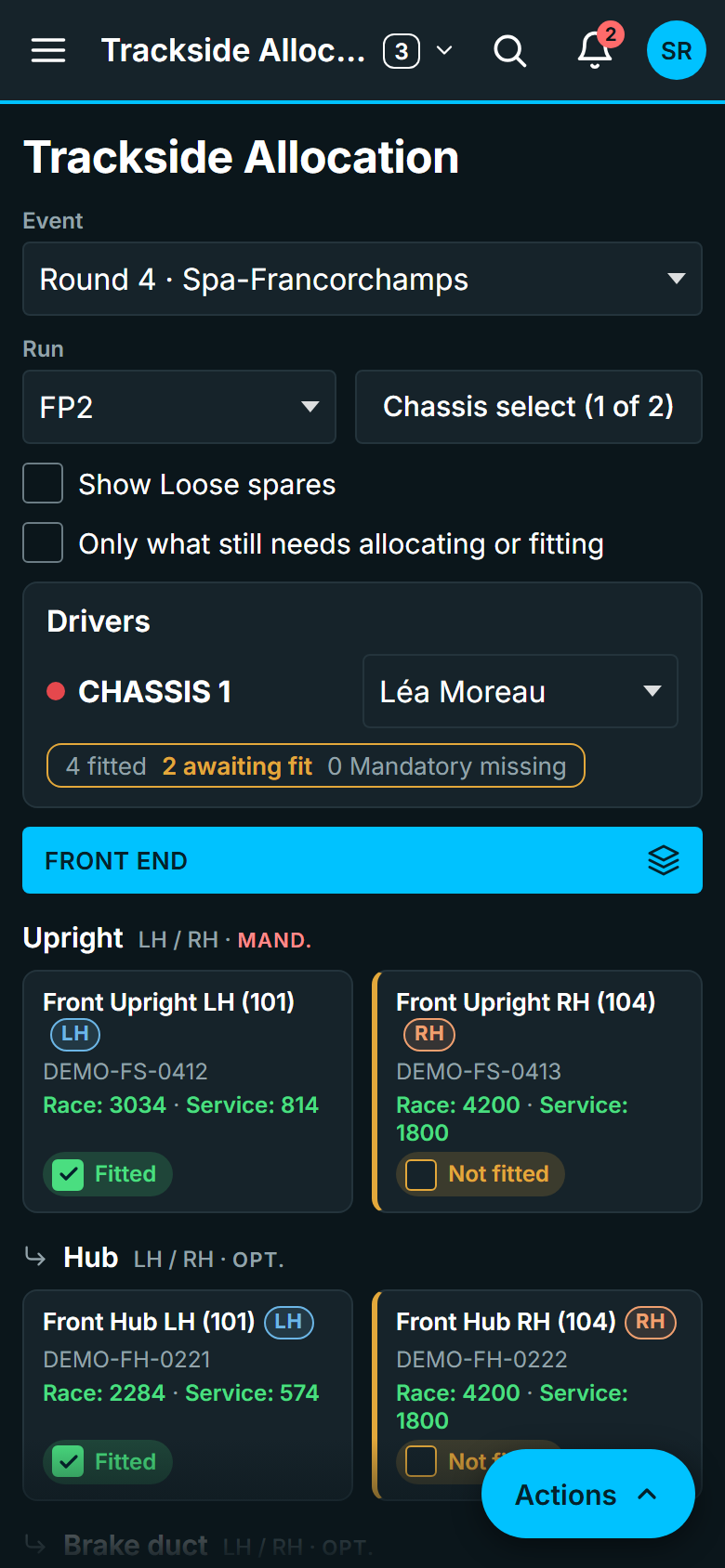
Trackside gives the race team what they need during an event: what's fitted to each car, the jobs to finish before the next session, and what's going back to the factory. It works on a phone or tablet, so it goes wherever the team goes.

  • Jobs at Track: each car's jobs by session, with saved job lists to add the usual ones in one go
  • Assemblies to Fit and Trackside Allocation: what's allocated, what's fitted and what's missing
  • Run Plan: the race engineer's numbered runs, cars, laps and fuel for each session, ready to print
  • Return checks for damaged assemblies, and a Returns List shared with the factory
  • Part Care Notes keep what the team knows about each part to hand at the track
MAP's Trackside Allocation on a phone: Chassis 1's uprights, hubs and brake ducts with Fitted and Not fitted tick boxes
Trackside on a phone: the same records the factory sees.

Allocations

Plan every car for every event

Pre Allocation lays out each car's slots for an event: Mandatory, Optional and spare. Drop a build onto a chassis and its linked sub-assemblies follow it into their own matching slots, left and right hand respected. Mandatory slots stay flagged until they're filled.

  • Pre Allocation Overview: every build against every event, with the mileage it will have left
  • Copy a plan to the next event, or clear it and undo in one step
  • Fitting a slot moves the parts onto the car in Mileage Tracking, so the mileage reaches them
  • Warnings when a build won't last the events it's planned for
  • Each business area plans in its own assembly structure
Dragging a Front Upright LH build from the Available pool onto Chassis 2's empty LH slot in MAP's Pre Allocation board; its linked hub and brake duct fill their own slots and Chassis 2's '1 Mandatory missing' clears to 'ready'
Drop a build on a chassis and its linked sub-assemblies follow it into their own slots.

Jobs, stock and manufacture

The work around the builds

A lightweight ERP layer, there so that the movement of parts is recorded in the same system that tracks their build and their life. A serial number is created once, whether it arrives on a purchase order or comes off a work order.

Job List

Raise, assign and track the jobs that aren't build sheets, from "re-machine bracket" to "investigate vibration on car 2". Give a job an event and a chassis and it becomes a task for the race team at the track.

  • Work Assigned to Me and My Active Jobs, with clocking on and off
  • Part Care Notes: the team's knowledge base for each part

Inventory

A stock catalogue with quantities at each stores location and an append-only ledger of every receipt, issue, transfer and adjustment. Serialised stock shares its records with Mileage Tracking.

  • Stock counts, scrapping and transport requests
  • Spares planning from how often parts come off, and BOM-driven forecasting

Purchase Orders

Raise purchase orders against your suppliers and receive against them. Receiving a serialised part creates its record in Mileage Tracking at the same moment.

  • Orders over your threshold wait for a second person to approve
  • Bulk import, Late Purchase Orders and Supplier On Time reports

Work Orders

Manufacturing and service work orders, routed from operation templates and loaded with materials straight from a BOM. A build sheet raises its own work order automatically, unless you switch that off.

  • Issue material, record production, and log time by clock or by hand
  • Capacity and Dispatch, and the Work Order Backlog

Resource Planning

See who's free before you promise the work

Resource Planning brings the Company Calendar, leave, company holidays and a capacity forecast together, built on the same jobs and work orders as the rest of MAP, so the plan and the work never drift apart.

  • Allocate Resource: the week ahead, each person's hours left, and work handed out in a click
  • Leave requests and approvals, and nobody approves their own
  • A capacity forecast from working hours, leave and the work that's due
  • The Company Calendar in month, week, year and agenda views, with team events and shipments
MAP's Allocate Resource board: a gearbox rebuild dragged onto a technician puts them 3 hours over their day, then it goes to a colleague with room, the first technician is taken off it, and both people's hours rebalance
Drag a job onto a technician and watch their day fill; anyone over capacity shows in red.

The office

Reporting, finance and people, on the same records

The cost of a build and the hours behind it come from the same records as the build itself, so the office works from what the factory and the race team have already recorded.

Reporting

Build reports and dashboards by dragging charts onto pages, and share them in workspaces. People who know SQL can query the same data in a read-only SQL workbench.

  • A report never shows more than its reader could already see in MAP
  • Export to Excel or CSV, with permission

Finance

The books for each legal entity, fed by what MAP already records: journals, payables and receivables, bank reconciliation, fixed assets, budgets, and VAT returns and filings.

  • Work-order costing and a sporting cost cap report
  • Approvals with segregation of duties

HR

The person behind each account: employment over time, working patterns, leave balances, skills and training, recruitment, reviews, health and safety, event rosters and timesheets.

  • Payroll inputs for your payroll bureau
  • Sensitive details encrypted, with permissions of their own

Admin

Admin and user management, included

Day-to-day set-up happens in Admin, without code changes or restarts. It comes with every licence, whichever apps you choose.

  • Users and permission groups built from individual permissions, not fixed roles
  • Business areas, each seeing only its own data
  • Templates, BOMs, assembly types and lookup lists
  • Single sign-on providers, SCIM and API keys
  • Your company name, logo, colours and font
  • The audit log, active sessions and your licence
  • Support tickets raised from any screen, each with its own reference
  • Business Config export and import between installations

Sign-in and security

Your identity provider, your permissions, your audit trail

Sign-in fits the way your organisation already works, and every action is checked against a named permission on the server, whatever the screen shows.

Single sign-on

Any number of OpenID Connect or SAML 2.0 identity providers, such as Microsoft Entra ID, Google, Okta or Auth0, added in Admin with no code change or restart. Group claims can map to MAP permission groups.

SCIM 2.0 provisioning

Your identity provider creates, updates and deactivates MAP accounts as people join, move and leave, so nobody has to mirror group membership by hand.

Two-step sign-in

Local accounts can add an authenticator app, with recovery codes, and an administrator can require it for everyone. Passwords need at least 12 characters, and an idle session signs out after an hour.

Permissions and business areas

Every page and server action checks a named permission. Business areas are a hard boundary: a record in another area behaves as if it doesn't exist, in the app and through the API.

An audit trail MAP can't rewrite

Sign-ins, sign-offs, settings and every Public API write are recorded with who, when, and the values before and after. Nothing in MAP can change or delete an audit event once written.

Sensitive fields encrypted

Bank details, employees' personal details, HR cases and authenticator secrets are encrypted by MAP itself (AES-256-GCM) under your installation's own key before they reach the database.

Integrations

Connect MAP to the rest of your systems

The Public API and SCIM provisioning are licensed as add-ons for each installation. See pricing.

Public API

A versioned REST API (/api/v1), read and write, cursor-paged and described by an OpenAPI 3 document. An OpenAPI 2.0 version imports straight into a Power Platform custom connector. Each API key acts as one MAP user and can never exceed that user's permissions.

SCIM 2.0

Provision MAP users from your identity provider, with their own bearer tokens. A SCIM delete deactivates the account and keeps its history.

Excel and PDF

Import and export Excel workbooks in many places, from stock to work orders, and print PDFs where paper still matters: build sheets, Run Plans and shipping manifests.

Deployment

Run it yourself, or let us run it for you

Both options run the same software, with the same apps and the same features.

Self-hosted, including air-gapped

Install MAP on your own servers, with your data in your own PostgreSQL database. Your licence is signed, and MAP checks it on the server itself, so it runs with no internet connection at all.

  • Linux, Windows Server, Docker or Kubernetes with Helm
  • No licence server and no telemetry: nothing is sent back to us
  • Release files are checked offline at install, like the licence

Managed hosting

No IT team to spare? We host your MAP installation for you, so there are no servers for your team to look after. Your people simply sign in from a browser.

  • The same apps, licence and features as self-hosted
  • Single sign-on with your own identity provider
  • Priced as a share of your app licence: see pricing

Everyday use

The details that make it easy to live with

Works on a phone

Every page works on a phone or tablet. Add MAP to the home screen and it opens like an app; scan barcodes and QR codes with the camera when loading a shipment.

Your brand

Set your company name, logo, colours and font in Admin. Your company name carries through to emails and exported files too.

Help built in

A Help guide inside MAP explains how it works, with step-by-step how-to guides and help for each page.

What's new, for each person

After an update, each person sees the release notes for the parts of MAP they use, once.

Support tickets in the app

Raise a support ticket from any screen. Each gets its own reference and is tracked in Admin, even if email isn't set up.

Light, dark and clear colours

Light and dark themes, and a choice of standard, colour-blind friendly or high-contrast status colours.

How MAP is designed

Built with the people who use it

MAP is shaped by subject-matter experts: people who build, inspect, plan and race. They describe what they need in their own words, try each change on a preview with sample data, and every change is reviewed before it goes into a release.

That's why MAP uses the words your team already uses, and why it's strict about the details that matter: a serial number is created once, every sign-off records who and when, and history is kept, never overwritten.

  • Each physical part has one recordIt follows the part through build sheets, car trees, allocations and history.
  • Warn on engineering judgement, block on data integrityMAP flags expired life but leaves the call to your engineers; it refuses duplicate serials and negative stock.
  • Configured, not codedPermissions, statuses, templates and sign-in are set up in Admin.

For IT and engineering

The technical bit

For the people evaluating how MAP is built as much as what it does.

React Vite

In the browser

A single-page React app built with Vite, talking to the server over a JSON API. The Inter typeface is served with the app, and the app makes no calls to third-party sites. The first download is kept under 154 KB of compressed script; the rest loads as pages are opened.

Node.js 22 Express

On the server

A Node.js service on Express that checks permissions on every request and handles OIDC and SAML sign-in and Excel and PDF files. Sessions are kept in the database, so several server processes can share the load.

PostgreSQL Prisma

In the database

PostgreSQL 15 or newer (16 recommended), through the Prisma ORM with versioned migrations. The audit table belongs to a separate database role, so MAP's own role can be refused permission to change or delete it.

See MAP with your own parts and processes

We'll walk your team through the apps you're interested in, using an example that matches how you build and run your cars.